

Adult Video "Hot Japanese JAV Online XCITY"
You can enjoy everything on this website as much as you want just with an affordable fixed rate of 3,135yen per month(including tax).
XCITY supports SSL/TLS communication always. Uses strong encryption for all pages to send data such as personal information and credit card, you can use our site safely.
Information about our customers is an important part of our business, and we are not in the business of selling it to or sharing it with others.
If you have any question, please check this help.
If that does not find answer then please contact us below.

* If I can not log in, you may not enter the correct, ID and passwords are case-sensitive.Please check. However, if you forgot
your login ID and password, you can check
here (Forget you Log in ID and/or Password?)
* If you can see the following page starts with “https: / / ~”
If you can see the following page starts with
https://regist.xcity.jp/english/member/login.php. You may use older version of WindowsXP service pack.
Please rely on the service pack WindowsUpdate.
* Login button is pressed, the input data is out, and when the login screen
Your PC doesn’t save the Cookie. Please consider the following: Review the settings for Cookie
TOP Page (https://xcity.jp/) you press “ENTER” button, but not go to main page, this also cause by your PC doesn’t
save Cookie for flag “I am over 18” is clicked.
Below, Cookie settings please.
1. Internet Explorer menu “Tools” -> “Internet Options”, “Internet Options,” select “Privacy” tab, click “Default”
button. Or go to “Sites” and change to accept cookie on xxx.xcity.jp.
2. If the above does not work, please check the security software such as Norton Internet Security does not block
to save Cookie.
Please see here and follow the instruction.
If you don’t receive email from us after registration, please check the junk mail box first. Sometimes our email is sent there, especially if you’re a Hotmail or Yahoo! Mail user. Additionally, please check if your mail box is not full. When your mail box is not full and you don’t find our mail in the junk mail box, your email address might be registered incorrectly. In this case, we appreciate it if you make a registration again.
If your card charge does not go through to the credit card company, we will automatically change your membership to
“free membership”.
There are some reason these happened:
-- Has not been updated for a credit card expiration date
-- Credit Limit Exceeded
-- Lost card re-issued by the Corruption (If the card number has changed)
If you wish to re-activate paid membership, the card information must be entered again.
We charge your membership fee on the last day of the previous month from ID expiration date. Please check your credit card company statements.
When you may get this error message after updated to iOS 11.
“Somthing went wrong during native playback.”
If you got this error message, please open “Settings” > “Safari”,
turn off “Prevent Cross-Site Tracking” and “Block All Cookies” switches off.
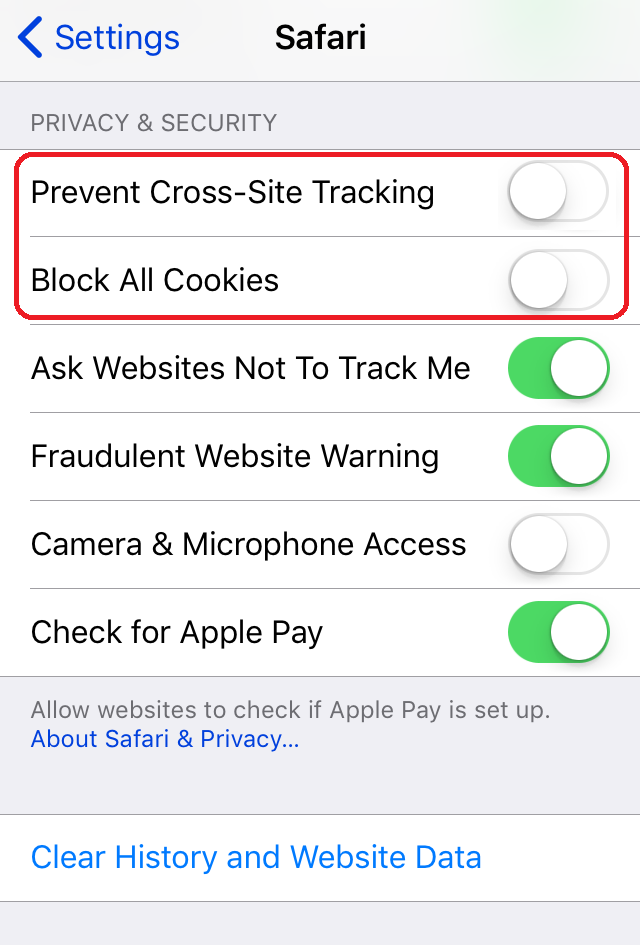
If still have this problem after change, turn off you device and try again.
On iOS 11, turn landscape and pinch-out by 2 fingers to maximizing play back screen.
Reset maximizing playback, pinch-in 2 fingers.
You can use same ID and Password for Smartphone version too to use our services.


